Most squads do not need a meet day timing truck for Tuesday practice. They need repeatable start to finish times and a setup that does not eat half the session.
Laser gates and proprietary timing kits still win for official meets and deep budgets. For everyday training, two phones (or a phone plus a laptop) can cover a lot of that job if you treat them like practice tools, not FAT.
SpeedTrackr turns two devices into wireless timing gates (the second can be Android, iPhone, or a laptop). This post is the decision guide: when phone gates make sense, where they stop, and how to set them up cleanly.
For a deeper product walkthrough (modes and detection choices), see the AI photo finish guide. For a side by side hardware framing, see phone sprint timing vs laser gates.
What you are actually buying with laser gates
Hardware timing is great when you need:
- Certified or near meet workflows
- Fixed installs on a specific track
- A budget that already includes gates, stands, and spare batteries
You also take on cost, packing, and the habit of only timing when the kit is out. Plenty of clubs own gates and still hand time half their reps because setup friction wins.
Phone gates flip that tradeoff. If athletes already carry phones, you can time more sessions with less gear. The second gate can be Android, iPhone, or a laptop.
What dual phone timing is (and is not)
It is: practice grade wireless start and finish timing between two devices (the second can be Android, iPhone, or a laptop). Useful for full runs and block starts when you want a single elapsed time you can trend week to week.
It is not: certified FAT, Olympic lab timing, intermediate split timing, or a native iOS App Store app (iPhone users can use the web app). Do not use phone gates as the sole clock for official results or selection decisions that require federation approved timing.
It is more consistent than a hand stopwatch for practice. It is not official timing, and it is not a guarantee for every surface, light level, or phone model.
If someone asks for “laser accurate” marketing language, push back. Honest practice tools age better than oversold ones.
Phone gates vs hand stopwatch
Hand timing is still fine for rough effort. It breaks down when:
- You need start to finish without a second coach’s reaction time
- You want the same finish mark every rep without guessing
- You compare athletes across days and the “same” hand time drifts
Two phones remove most of that human reaction gap for practice. You still coach the session. The phones just stop arguing about who hit the button late.
A clean practice setup
Here is the public setup for a typical timed run (example: 30 m), matching what coaches use in the app:
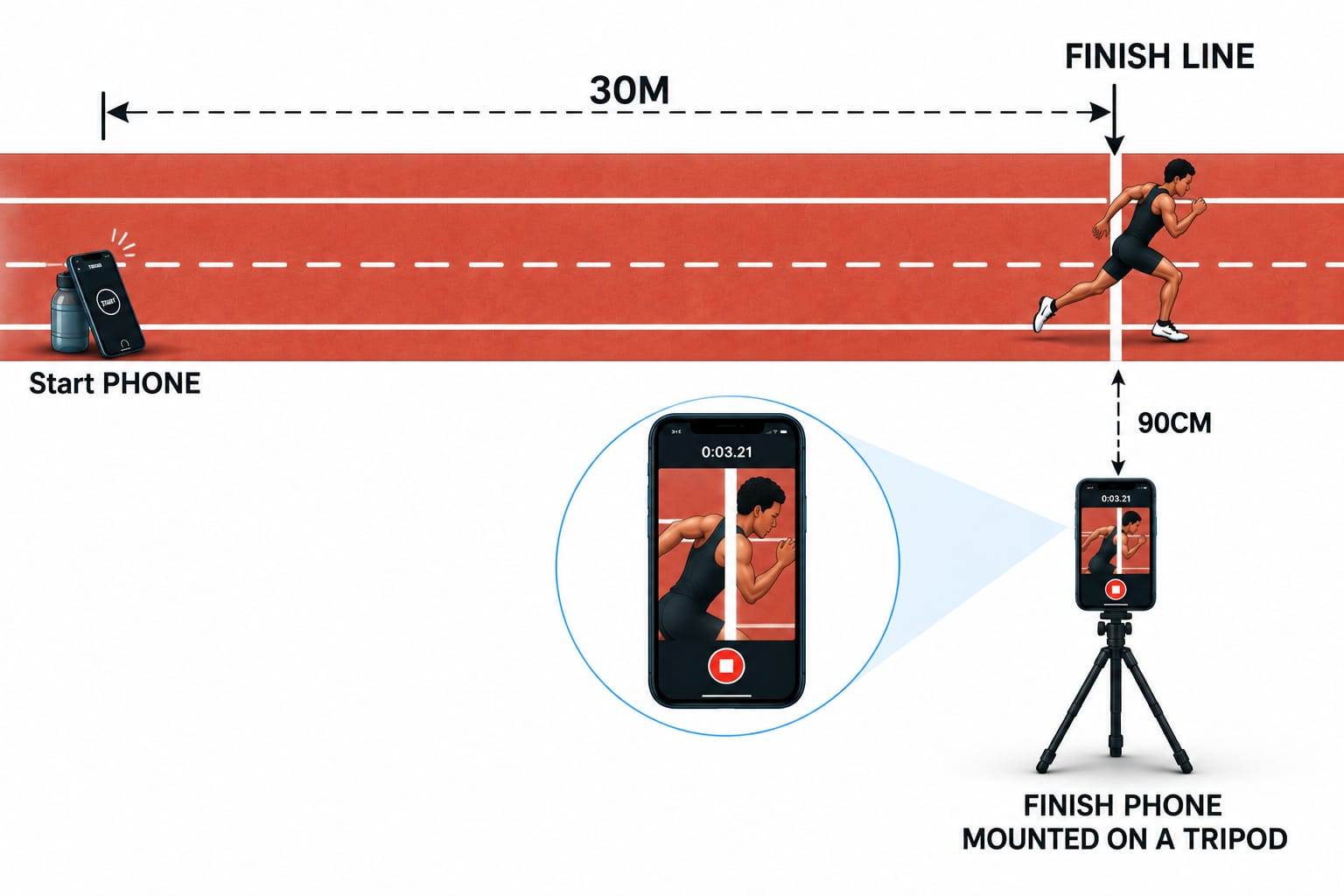
- Put the start phone at the start mark (propped safely on the ground or a stand).
- Mount the finish phone on a tripod about 90 cm from the lane edge, facing the finish line.
- Keep the finish phone portrait and still.
- Align the on-screen timing line with the physical finish mark.
- Use decent light. Harsh backlight and heavy night glare make any camera system worse.
- Pair start and finish devices before the first rep (Android app, or web for a mixed finish device).
If a rep looks wrong, check the physical setup before blaming the athlete. Most “bad times” are phone tilt, line drift, or someone walking through the frame.
When to keep (or rent) hardware anyway
Stay with laser or club hardware when:
- The session feeds official seeding or championship selection
- Your federation requires certified timing
- You already have a working gate cart and staff who love it
- You need true intermediate split times between more than two points
Use phones when:
- You want more timed reps with less packing
- You train away from the main track
- Budget is the blocker between “guessing” and “measuring”
Many programs will use both: hardware for big days, phones for volume.
Getting started on Android
Start with timing gates, then keep the same finish mark across the block so times stay comparable. The second device can be Android, iPhone, or a laptop. For more than a start and finish clock, lean on the rest of the suite: import-then-analyze VBT and vertical jump, one-phone reaction, and the coach athlete roster. Coach Mode is on the web app and the Android app.
Helpful links:
- Reaction Pro for solo start reaction between full timing sessions
- Race Clock to time a sprint from one phone video when you only have one phone
Measure practice. Leave meet certification to meet gear. That is the whole point.
Put it into practice.
Turn this insight into numbers: time your sprints, measure your jumps, and track your reaction time with SpeedTrackr for Android.
Free 4-week sprint plan.
Join the weekly sprint newsletter and get a research-backed 100m training blueprint: acceleration, max velocity, plyometrics, and speed endurance. Instant download.
Weekly, no spam. Unsubscribe anytime.